HDR Tip #2

The second in a series of tips on how to process HDR images.

These HDR tips resulted from a conversation with my good friend Andreas Waldeck, an HDR expert who happens to work with HDRSoft, the publisher of the premier HDR software Photomatix Pro.

In Tip #1 we talked about the correct way to capture multiple images HDR images in the field.  See HDR Tip #1.

Now I want to start discussing the processing of these image files.  The software tools we’ll discuss are Lightroom, Photomatix and, to a much lesser extent, Photoshop.  So let’s get started.

Continue reading “HDR Tip #2”

(2623)

Why I Attend Workshops

Life is too short and there’s too much to learn. I could approach photography on a do-it-yourself basis and grow by trial and error. And while I never stop exploring and discovering new things on my own, it’s slow. Or I can accelerate the learning process and work with other photographers whom I admire. They have a lot to offer and workshops with them gives me the chance to soak up as much as I possibly can in a short, concentrated period of time. And, I get some great photographs.

I’m a professional nature photographer.  I not only take and sell photographs  but also conduct workshops in some beautiful locations around our world.  Admittedly I’m relatively new to the business and am not one of the big names of outdoor photography – yet.  But I have a loyal following that continues to grow.

Like I said, I lead workshops, both on my own and teamed up with other great photographers.  I believe my workshops have a lot to offer photographers of all skill levels from novices and amateurs to professionals.  And our attendees confirm that with their comments.

First of all, we get to great locations and we photograph them in the best light.  Location and light are the two most critical elements for exceptional outdoor photography.

Second, we provide lots of one-on-one attention.  The primary reason most attendees sign up for workshops is they want to become better photographers.  So we really focus on working individually with each photographer on the areas in which they want (and need) to grow.  I say ‘need’ because often the attendees don’t have a clear idea of what areas to focus on and we can help with that.

Third, my partners and I have our own unique personal styles of photography that we share with our attendees, both overtly and in more subtle ways.  If an attendee knows our work, presumably they like it and may want to learn how to do what we do for themselves.

So, with all that by way of introduction, that’s why I attend workshops.  I can photograph unfamiliar areas of our earth with someone who is intimate with the location, its best views and light.  Second, I may feel pretty comfortable with my technical and creative skills but, let’s face it, there’s always more to learn.  Happily, it’s a never ending process.  Thirdly, the workshop instructor’s personal style is just that – personal, unique to that individual.  Working with them for three to five days is a wonderful way to absorb some of their magic and stretch my own personal style.  After all, simply put, our personal styles are our means by which we express yourselves through our art.  It is something that is growing all the time.  Working with other skilled photographers just helps it grow faster.

To sum it all up, life is too short and there’s too much to learn.  I could approach photography on a do-it-yourself basis and grow by trial and error.  And while I never stop exploring and discovering new things on my own, it’s slow.  Or I can accelerate the learning process and work with other photographers whom I admire.  They have a lot to offer and workshops with them gives me the chance to soak up as much as I possibly can in a short, concentrated period of time.  And, I get some great photographs.

Join me on an upcoming workshop.

To see more of my photographs click here.

Become a fan on Facebook and follow along.

(986)

HDR Tip #1

Announcing 2010 photography workshops

I shoot a lot of HDR.  That’s where you take multiple images at different exposures so that you capture the full dynamic range of the scene in front of you.  Many people consider HDR to be unnatural and you can definitely get a surreal effect.  But HDR is the only way you can capture certain challenging scenes and make the results look like what you see, not what your camera sees.

I had a talk with my good friend Andreas Waldeck who works for HDRsoft, the creators of Photomatix.  This is the premier software for doing HDR.  Andreas shared some things with me that were real eye-openers and I’d like to pass them along to you in a series of HDR Tips.  So let’s get started with the first tip.

Continue reading “HDR Tip #1”

(2456)

Epson 4800 Tip

A tip for preventing nozzles from clogging.

I have an Epson Stylus Pro 4800 printer that I basically love.  Having a high quality printer like the Epson really unleashed my creative potential by giving me the ability to fine tune my photographs.  Sending proofs off to labs and even waiting only a couple of days to get them back (like some of the better labs do) just wasn’t working out.  Realistically, I could only do a couple of proofs.  But with my own printer I can run scores of proofs if I need to.

There is one thing about the Epson that’s been bugging me though.  I have nozzle clogging problems.  It’s from two things – the relatively dry atmosphere here in Southern California and the fact that I don’t print every day.  It gets so bad that I would sometimes have to spend an hour repeating the nozzle check and head clean before I could start printing.  It wasn’t fun.

But last weekend I heard a tip from two people.  Musical instruments, especially the kind made from wood, suffer from the wood drying out in low humidity conditions.  And that affects the quality of the sound.  So musicians purchase a humidifier device to put in their instrument cases.  It maintains the humidity inside the case at an optimum level which keeps their instrument sounding its best.

The suggestion was to purchase one of these and place it inside the 4800.  Well, the advice made total sense but I took a different tack.  We had a Starbuck’s shot glass sitting around.  I took a kitchen sponge and cut it into four strips.  Two of these fit perfectly in the shot glass.  Moisten the sponges, insert them in the glass, add a little extra water (not too much), set it inside the printer way out of the way where the print head wont hit it, and cross fingers.  After one day I  ran a nozzle check.  Wow, it was almost perfect, good enough to try a print.  I printed a proof and it was just great.

Since then I’ve printed more and it’s working perfectly.  I check the water level every other day or so and am amazed at how quickly it goes down.

So, while time will tell, it seems the nozzle clogging problem may be solved.  And I don’t have go to through the onerous chore of unclogging nozzles before I can print.  I’m cranking out proofs and feeling productive and creative again.  I’m a happy camper.

Join me on an upcoming workshop.

To see more of my photographs click here.

Become a fan on Facebook and follow along.

(1165)

Composition – Rule of Thirds

A short discussion of the rule of thirds with examples.

There’s a simple compositional technique you can apply to quickly improve the quality of your pictures.  It’s fun and easy and works in so many situations.  It’s called the “Rule of Thirds,” and it goes a little something like this.

Continue reading “Composition – Rule of Thirds”

(1857)

The Making of a Photograph Part 3 – Photoshop First Round

In part one and two of this series I described how I selected the file to work on and explored the potential of the image in Lightroom.  The treatment I ended up with would be exported into Photoshop and we go from there.

Read Part 1

Read Part 2

After trying several approaches particularly with regard to the color of the light I selected one that was very much like the unadjusted file.  The only change was opening up the shadows in the valley floor a bit.
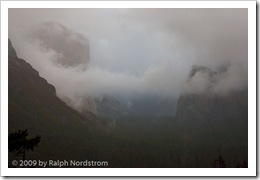
Yosemite_4Now the fun begins.  While Lightroom 2.x supports local adjustments I prefer to do the local adjustments in Photoshop.  I just feel that I have more control in Photoshop.

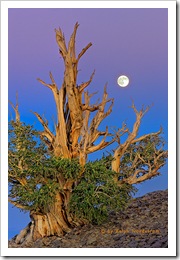
The first thing to deal with is the silhouette of the pint tree in the lower left hand corner.  I used the clone stamp tool to get rid of that.  I have no qualms about removing things that distract from the image.  But I draw the line at adding things.  Someone asked me if I added the moon in Bristlecone Moonrise.  No, I was there and that was the moon.  What’s the point of faking it.  The experience in the field would simply not be the same.  It’s so exciting to take an image like this and think you’ve got it.  But there’s always the nagging doubt in the back of your head wondering if you overlooked something and messed it up.   You never know until you get back at your computer to see what you really have.
bristlecone_moon_2008

But back to Yosemite.  So the pine tree silhouette had to go.  Also, I checked the image for dust spots and only found one or two.  The spot healing brush took care of them.

The next step was to do some local adjustments with Viveza.  It’s a cool tool from Nik Software that allows you to select an area and control brightness, contrast, saturation and more.  The clouds in the upper right needed contrast enhanced a little.  Next a couple of Curves with layer masks helped open up the valley floor even more.  I tried some vignetting on the bottom and really liked the way it funneled the eye into the center of the image where everything was happening.  I didn’t think I’d need any  vignetting for the top corners but tried it anyway and liked that too.

I made some global adjustments too.  Selective Color helped warm the reds with some yellow, lighten the yellows and darken the blues.  Color Balance also shifted the overall color just a couple points to the yellow.

Sorry I don’t have images of each of the steps along the way but that pretty much finished up the first evening.  The image was starting to get interesting and it was time to sleep on it and come back another day to take a fresh look at it.
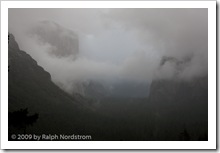
Yosemite_1
Original Capture
Yosemite_Edit_1
After Photoshop Session 1

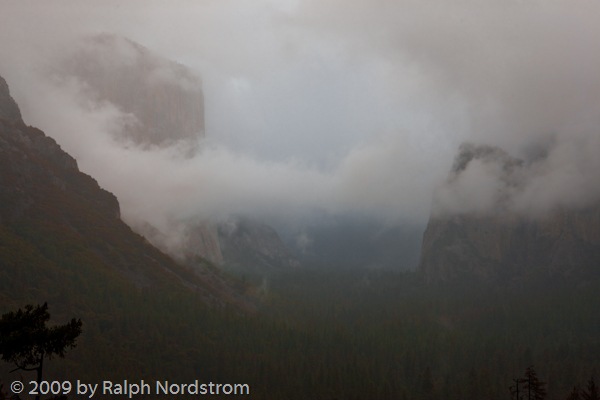
Here are the two side-by-side.  It’s starting to take shape.  There’s a little hint of warmth in the clouds and they stand out more from the background.  The valley floor is better defined and the trees stand out a bit more.  There’s actually a subtle feeling of warm light down there.  El Cap and Bridle Vail Falls also are more prominent and their warmer tones contrast more with the overall picture’s coolness.  You can click on the images to enlarge them.

Even before I fell asleep that night I was thinking of what needed to be done next.  As you work on an image you become satiated to the colors, tonalities and contrast and you can’t tell if they are good or not.  You also get emotionally involved.  So it’s good to stop, get away from it and return another day.  Sometimes when you return you are pleased and other times you say to yourself, “What was I thinking?”  When I get the latter reaction it usually means starting over from the beginning.  We’ll come back to this technique when you get far enough along to start making proofs.

So come back for #4 in this series to see if I  said, “What was I thinking?” or if I picked up from where I left off.

To see more of my photographs click here.

Join me on an upcoming workshop.

Become a fan on Facebook and follow along.

(1045)

On the Virgin River Bridge at Sunset

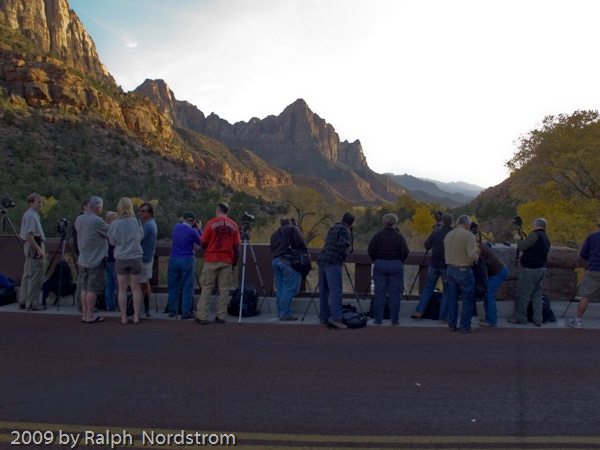
Zion National Park in Southwest Utah has a sundown tradition amongst photographers of all kinds.  We gather on the bridge over the Virgin River in hopes of being there for one of those spectacular sunsets that can only be viewed here.

It doesn’t always happen.  But the ritual continues.  About two hours before sunset we start assembling.  Talk to your fellow photographers and you’ll likely find people from around the world.  Or, someone from your own back yard.

Soon the crowd builds and begins to spread out across the bridge, jockeying for the best locations.  So we tend to bunch up around the premium spots.

(c) 2009 by Ralph Nordstrom

Continue reading “On the Virgin River Bridge at Sunset”

(610)