Lightroom Tutorial – Expose to the Right

For a followup post read

http://ralphnordstromphotography.com/wordpress/articles/how-to-articles/expose-revisited/

The light meters in our digital cameras don’t always give us the best exposure.  That’s not to say that they give us the wrong exposure.  But the ‘correct’ exposure doesn’t necessarily produce the best image file as far as post processing is concerned, especially if we’re shooting RAW.

If you expose an image at the exposure selected by your light meter and check the histogram, chances are it’s skewed a little to the left, toward the shadows.  This is especially apparent in low contrast scenes.  The image might look great on the camera’s LCD and in Lightroom.  But a slightly overexposed image will capture more information and is therefore better to work with later – given of course that it’s not so overexposed that you have highlight clipping.  An ideal histogram is one that is just to the right of center.  This technique is called ‘Expose to the Right,’ and is practiced by many of digital photographers.

Continue reading “Lightroom Tutorial – Expose to the Right”

(8054)

Principles of Composition – Chaos

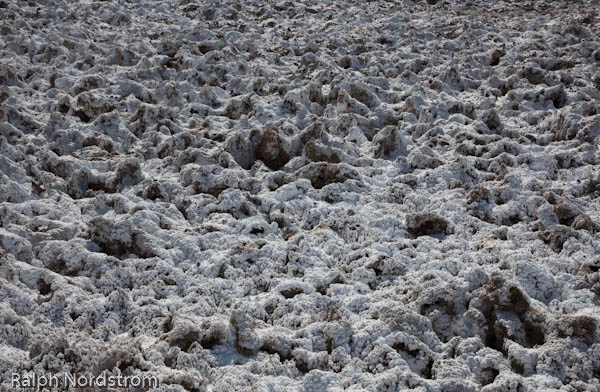
“… nature – unadulterated and unimproved by man – is simply chaos.” Edward Weston.

There’s no argument that Edward Weston was one of the finest photographers that ever tripped a shutter.  And one of the aspects of his photography that he is most revered for is his compositions.  He was the absolute master in his studio but when it came to photographing nature he admitted that it was the most difficult of all.  Why?  Because nature is chaos.

Nature is Chaos - Death Valley National Park Nature is Chaos

Continue reading “Principles of Composition – Chaos”

(1936)

Photo Foundations – Focus

When I’m asked how I get such intense landscape photographs I respond that it all begins with the fundamentals, the photo foundation.  Given that you have the other elements of a great photograph – a terrific subject and fantastic light – you are still not guaranteed a compelling image if it doesn’t have a solid foundation.

What is the photo foundation?  It’s two things – a proper exposure and the correct focus.  These are so basic we never talk about them much but, if you’re like me, you’ve had to walk away from a potentially great image because one or both of these were not carefully attended to in the field.

This post discusses focus.

Focus


Sharp images are the goal of most landscape photographers.  We have two options when it comes to focusing – autofocus and manual focus.

Autofocus


Cameras use multiple built in focus points to focus the lens.  When you depress the shutter half way, the processor in the camera determines which of these focus points to use and which to ignore.  It then focuses the lens.  The processors are extremely sophisticated and generally do a very good job.

But not all the time.  Sometimes they choose the wrong focus points.  Fortunately, most digital cameras allow you to tell the camera what focus point to use.

One thing to take into consideration when using auto focus is the fact that the focus may be off ever so slightly.  This can be corrected by sending your camera and lenses to your manufacturer’s service center and having them calibrate your body to your lenses.

Manual Focus


With early film cameras manual focus was the only way to go.  Various devices were used to help the photographer get a sharp focus including prisms and split images.

But without these devices it’s difficult to manually focus while looking through the view finder of a digital camera.  But with the development of Live View (the ability to see your image before you capture it) on digital SLRs, manual focus is now the most precise way to focus.  Here’s how.

Display the image on you LCD screen using live view.  Select the object you want to focus on and zoom in on it.  Focus the lens (make sure it is set to manual focus) and zoom back out.  Take your picture.  It’s as easy as that.

Hyper Focal Distance


Above we’re referred several times to selecting the object you want to focus on.  But how do you do that?

The goal is to have the nearest and farthest objects both in focus.  This requires two things – depth of field and focusing at the hyper focal distance.  What’s that?  Well, simply put, at any given depth of field it is the distance that will have objects at infinity just in focus.  You don’t want to focus on the objects at infinity because that will place your foreground objects out of focus.  And you don’t want to focus on your foreground objects because infinity will be out of focus.  You want to focus somewhere in between.  But where?

Generally speaking, given that your depth of field is adequate to cover both foreground and background, you want to focus 1/3 the distance between your closest foreground object and infinity.  That’s because the depth of field is much shallower in front of the focal distance than it is behind.

You can actually print charts off the internet or by little circular slide rules that give you the depth of field and the hyper focal distance for any aperture – focal length combination.  I know photographers that carry a tape measure in their camera bags to precisely determine the hyper focal distance.

But there’s an easier way.  On your live view screen or through your view finder, select an object that is 1/3 of the way up from the bottom of the frame and focus on it.  Then shoot at f/22 and you got it.  However, if you are concerned about the effects of diffraction then maybe the circular slide rule calculator would be a good idea, if nothing more than to give you extra piece of mind.

Selective Focus


The opposite of a large depth of field is selective focus.  The goal is to have a very limited part of the image in focus and the rest out of focus.  To do this you minimize the depth of field by shooting with a wide open lens; that is, maximum aperture.  Longer focal length lenses have a shorter depth of field so one technique you might try is moving away from the subject and shooting wide open with a longer focal length lens.

When you’re using selective focus it’s critical that you get a very sharp focus on your subject.  In a flower that may be the pistils and stamens.  I wildlife, it’s the eyes.

Hand Held Photography


It’s worth mentioning hand held photography.  Most of the time landscape photographers will use a tripod to get the greatest sharpness in their images.  But there’s a freedom and spontaneity that comes with hand held photography.  And it’s still possible to get sharp images although not as sharp as you can get from your tripod.

The trick is to match the shutter speed with your focal length.  The formula is very simple.  The shutter speed should be 1 divided by the  focal length or faster.  For example, if your focal length is 50mm then you can get a sharp image if your shutter  speed is at least 1/50.  If your focal length is 200mm then you need to use a shutter speed of 1/200 or shorter.

You also want to do everything else to steady your camera like tucking your left elbow into your chest to give the camera a solid platform with your body.

Focus Summary


In summary, to get the sharpness you desire, first determine what object you want to focus on.  Determine the aperture and focal length settings that will give you the depth of field you want whether it’s hyper focal distance or selective focus.  Then focus.  If you’re using autofocus, select the focus point that is on the object you decided to focus on.  If you’re using manual focus, use live view to zoom in on the focus object.

Well focused, sharp images will provide your photographs with a strong photo foundation.

(1015)

Photo Foundations – Exposure

When I’m asked how I get such intense landscape photographs I respond that it all begins with the fundamentals, the photographic foundation.  Given that you have the other elements of a great photograph – a terrific subject and fantastic light – you are still not guaranteed a compelling image if it doesn’t have a solid foundation.

What is the photographic foundation?  It’s two things – a proper exposure and the correct focus.  These are so basic we never talk about them very much but, if you’re like me, you’ve had to walk away from a potentially great image because one or both of these were not carefully attended to in the field.

So let’s talk about exposure.

Continue reading “Photo Foundations – Exposure”

(1854)

Photoshop Tutorial – Neutral Grays

On how to adjust an area of a photograph to a neutral shade of black, gray or white.

I got a Photoshop question from Lynne in Iowa, a dear friend for many years.  She asked how you could adjust an area of an image to make it pure white.  I gave her a quick email response that outlined a technique but the question really deserves a more detailed and complete answer.  So, Lynne, this is for you and anyone else who encounters this situation in Photoshop.

In this Photoshop tutorial I am going to show you how to make this correction using an adjustment layer.  This technique actually applies to two situations that are encountered quite often – getting neutral blacks and neutral whites.

Continue reading “Photoshop Tutorial – Neutral Grays”

(1402)

Color Temperature

I spend a lot of time looking out our kitchen window at dawn, watching the way the light changes (usually sipping a cup of Dragonwell green tea).  It’s fascinating to see how one morning changes from the next.  And the best time of the year to see clear, colorful sunrises (and sunsets) is now – December and January.  The air is the clearest and freshest.

One of the things I really enjoy watching is how the color temperature changes from the time the outside just begins to lighten up until the sun is well overhead.  I’ve discussed this in other posts (Dawn).  What I want to do here is very briefly illustrate the point.

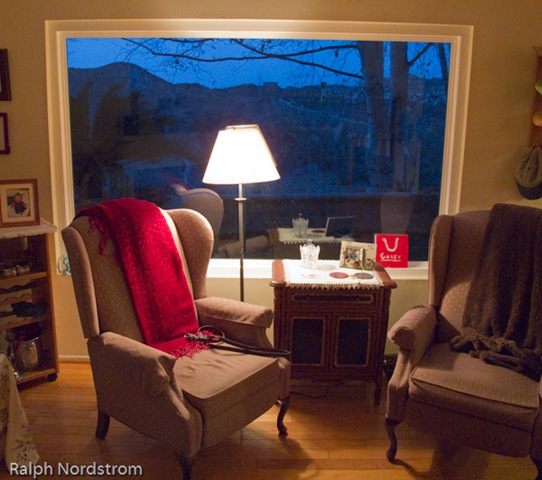
So this evening I grabbed this quick shot with my trusty Canon G11.

IMG_1030 This is looking out our back window after the sun has gone down (yes, I photograph twilight too).

You might say it doesn’t look real.  How could the outside be so blue?  But in fact, this is one of those cases where the camera doesn’t lie.  Given that the sun is way below the horizon and the source of illumination outside is the sky, then the light outside is in fact blue.  Inside we have incandescent lights, the color of which is definitely yellow.  The contrast of standing on the inside with warm light and looking out into cool light is both apparent and striking.

Suffice it to say that color temperature is a quantitative measure of the blueness or redness of the ambient light.  Color temperature is measured in degrees Kelvin and the scale goes opposite of what you would expect.  Low temperatures are red and high temperatures are blue (even though we think of reds as warm and blues as cool).  So the color temperature inside the room may be about 4500 degrees and outside it may be 9000 degrees or more.  We’ll get into this in more detail some other time.

As photographers we can use this understanding of color temperature to our advantage.  As digital photographers we always have the option of setting our white balance to compensate for the color temperature – daylight, cloudy, shade, tungsten, etc.

But we can also use this creatively.  We routinely use the warm light of the ‘golden hour,’ the hour after sunrise and before sunset, to give our images a warm glow.  But we can also use the cool light of dusk.

We don’t usually see the colors because our minds are stronger than our eyes and tell us what the color really should be.  But we can train ourselves to pay attention to what our eyes are telling us and actually see the color.

Give it a try.  With a little practice you’ll be able to see the blue in the shadows.  And you just might decide you like it and leave it in your images instead of correcting it out  because it doesn’t look real.

To see more of my photographs click here.

Join me on an upcoming workshop.

Become a fan on Facebook and follow along.

(1203)

Color Saturation in Lightroom

On three techniques for saturating color in Lightroom.

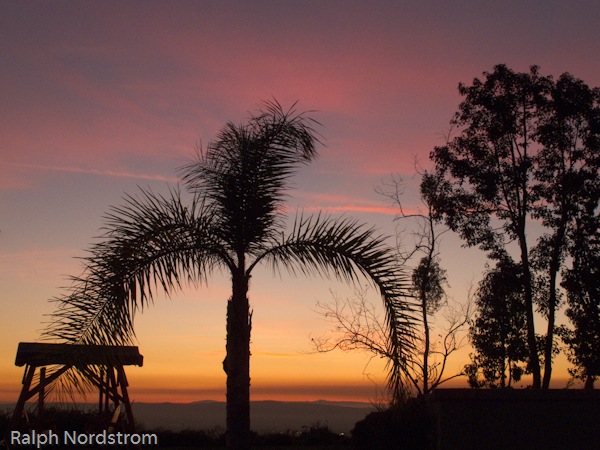
Last night we had a beautiful sunset.  The sky was baby blue, the clouds were pink and the horizon was golden.  I couldn’t resist.  So I grabbed my Canon PowerShot G11 and walked over to the neighbor’s front yard where the view is just a bit better.  I composed what I thought was an interesting image and snapped a few.

This morning I uploaded them and got to wondering about color saturation in Adobe Photoshop Lightroom.  I have a technique I’ve used for years to enhance colors but there are a couple of other techniques I thought I’d like to understand better.  The three Lightroom controls are:

  • Saturation
  • Vibrance
  • HSL (the control I use the most)

So, for starters, here’s the original unadjusted image.

sunset_original As you can see, the colors are really quite nice.  But my recollection of the sunset was that they were a little more saturated, more intense.

Continue reading “Color Saturation in Lightroom”

(4285)

Ten Tips for Exciting Nighttime Photography

There is a growing interest in a new kind of nighttime photography.  Photographers have been taking photographs of the nighttime sky ever since film was invented.  These photographs were generally long exposures that show beautiful star trails.  But now they are taking clear, sharp images of the stars and planets literally stopped in their tracks.

Astronomers have always been taking photographs of the nighttime sky and their goal has always been to get sharp images of the stars.  To do that they rigged their powerful telescopes with very precise motor drives that slowly turned the telescopes at the same rate as the stars move overhead, effectively holding the stars motionless in the field of view.

But with the advent of digital cameras the notion of photographing the night sky as part of a broader landscape has become increasingly popular.  And it’s not just star trail images that photographers are capturing.  They are capturing spectacular images of the planets, constellations and even the Milky Way over well known features on earth.  Wally Pacholka is one of the best of this new breed of photographers and his work is an outstanding example of this genre of fine art photography.  Check out Wally’s incredible Top Ten Night Sky Images to see what I’m talking about.

Continue reading “Ten Tips for Exciting Nighttime Photography”

(9986)

Epson 4800 Clogged Nozzles

A while back I wrote a post on the problems I have with my Epson 4800 nozzles clogging.  I don’t print on a regular basis so the printer will sit for days and weeks with nothing going on.  (See Epson 4800 Tip.)

In the original post I talked about putting a damp sponge inside the print area to raise the humidity.  It worked really well but then I was so excited that I did a lot of printing.

But over the Christmas holiday several weeks went by without any printing. And the sponges dried out.  So it was back to the same old dry conditions inside the printer.

Last night I wanted to start printing again so I moistened the sponges.  Then I ran a nozzle check and found the magenta was mostly clogged and the light cyan was totally clogged.

I gave it 24 hours, hoping that the increased humidity would loosen things up.  So, when I ran the nozzle check again today I was a bit disappointed to see that the magenta and light cyan were still very much clogged.  I prepared myself to repeat the ordeal I have gone through so many times in the past.

But here’s where the magic started.  I ran a head clean and then a nozzle check.  I certainly didn’t expect to see a good nozzle check.  But one head clean did the trick!  The nozzle check was perfect.  That’s unprecedented.  I have a ton of printing to do and I’m good to go!

It’s probably worth a few sentences to explain why clogging is a problem with the 4800 and the other Epson Stylus Pro printers.  It’s because they use  pigmented inks.  Most ink jet printers use dyes for the colors.  Dyes are colored molecules that dissolve in the solvent.  But pigments are ground up solids.  They’re very fine powders suspended in the solvents.  So if the solvent evaporates from a nozzle there is a residue of pigment left behind.  That’s what clogs the nozzles.

The big three printer makers – Epson, HP and Canon – are all working hard at resolving this problem and have varying solutions that I don’t want to go into here.  But if you have an older Epson like I do or possibly even a more recent model, this is a good tip to know.

So any hesitation about this technique I may have had  is dispelled.  It really works.  I can recommend it with a great deal of confidence – if you live in a dry area or your Epson sits for days or weeks on end without doing any printing, place a moistened sponge in the chamber with the print head and keep it moist.  It will really help in preventing the nozzles from clogging or, if they do clog, it will help getting then unclogged.

It really works.

To see more of my photographs click here.

Join me on an upcoming workshop.

Become a fan on Facebook and follow along.

(5236)

HDR Tip #3

On exporting images from Lightroom to PhotoMatix.

In the previous tip we discussed adjustments you want to make to your images in Lightroom to prepare them for the HDR process to come.

This next tips covers the step where we get the images out of Lightroom.

Lightroom is a RAW image converter (among other things).  It does RAW image conversions extremely well.  Other great RAW image converters are available to us – Capture One, Aperture, and DxO to name a just few.  These are all highly sophisticated products that do an extraordinary job.

Continue reading “HDR Tip #3”

(866)