The Making of a Photograph – Pond, Owens Valley 2011

Follow along in the making of a photograph as we go from kneeling in the mud to the final print on paper.

It all started with kneeling in the mud.

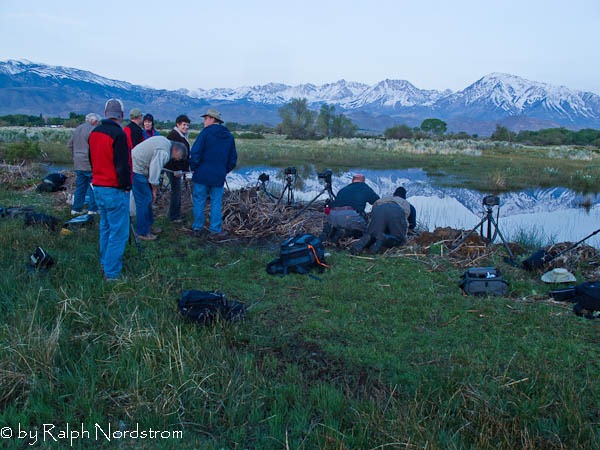
I was with David Muench, Jerry Dodrill and twelve other eager photographers on a Mountain Light Gallery workshop in May.  We lined up along the bank of the pond just outside Bishop, California and aimed our cameras at magnificent Mt Tom, the dominant peak in the Eastern Sierra crest in this area.

eastern_sierra_110506_IMG_6143

I’d like to take you through the process of making a photograph from the images I captured that morning.

Continue reading “The Making of a Photograph – Pond, Owens Valley 2011”

(1788)

Vacation Photography – What to Take

Read about the pros and cons of point and shoot and digital SLR cameras.

Good news!  Summer is here!  And we’re thinking “Vacation Time.”  Now, you don’t have to be a professional photographer to figure out that you’re going to take a camera.  So the question becomes, are you going to take your camera that has been sitting around for umpteen  years or use your upcoming vacation as an excuse to buy a new one.  (When it comes to buying camera gear, any excuse will do, at least for some of us.)

Continue reading “Vacation Photography – What to Take”

(1503)

Computer Upgrade

Read about the exciting experience of setting up a new computer.

A little over a week ago my new Dell Inspiron 580 arrived at my doorstep.  My wife and daughter finally convinced me to buy a new one.  I think they were getting tired of me storming around the house all grumpy and such when the old on acted up.  Disclaimer:  Computers act up after years of use not because they wear out but because of all the junk you load on them as time goes by that literally clogs the operating system.  So, with a little persuasion from my girls I gave Dell a call.Inspiron 580

If your one of those that gets into these things, here’s what I ended up with:

  • OS: Windows 7 Home Premium (64 bit)
  • Processor: Intel Core i% CPU 760 @ 2.80 GHz (it’s a 64 bit quad)
  • Memory: 8 GB
  • Internal storage: 1 TB
  • Display adapter: ATI Radeon HD 5450 (supports dual monitors – VGA, DVI and HDMI) with 1 GB memory)

So that’s the starting point.  And from here on it gets more interesting – not exactly the Chinese curse interesting but kinda-sorta.  I got a good deal on the Dell but it as it turns out I wasn’t even close to being done spending money.

Continue reading “Computer Upgrade”

(1258)

Mastering Exposure–Histograms Part 4

Learn more about histograms. We explore the histogram that results from low contrast scenes – how to capture it and what can be done with it in post processing.

In this series of articles we’ve been exploring the histogram.  In the first two articles we discussed what it is.  Now we’re looking at different types of histograms and exploring how to work with them both in the field and during the post processing.  If you want to review or catch up, here are the links to the preceding three posts.

Mastering Exposure – Histograms Part 1: Introduction

Mastering Exposure – Histograms Part 2:  A Closer Look

Mastering Exposure – Histograms Part 3: The Rocky Mountain Histogram

In this article I want to discuss my favorite histogram, the Mole Hill histogram.  I like this one because so much can be done with it in the post processing.  Subtle colors and tonalities can be revealed in soft radiant light.  It lends itself to some of the most creative and expressive images.

Read on and we’ll look at what it is, the conditions in which it occurs, how to photograph it and how to work with it in the post processing to reveal the scene in all of its hidden glory.

Continue reading “Mastering Exposure–Histograms Part 4”

(4763)

Mastering Exposure–Everyday Photography

This tip shows an easy way to get more exciting photographs from your point and shoot camera.

I talked to a lot of people at the Joshua Tree Art Festival this past weekend, sharing with them a little tip about getting better photographs from their point and shoot cameras.

In fact, this tip can apply to any digital camera for those times when you don’t want to have to pay close attention to the camera settings.  You may just want to shoot and have the confidence you’ll get decent photographs.

So this tip is very handy in that it will result in pictures with better colors and greater, more interesting contrast.  And it can be achieved in three simple steps.

Camera Mode
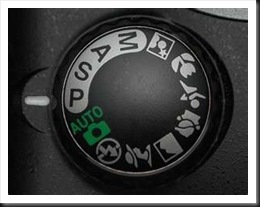
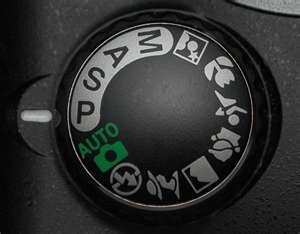
program_mode_settingOur cameras all have different shooting modes.  Many people I talk to use Auto pretty much all the time.  This is the mode where the camera takes care of everything.  In other words, it makes all the decisions.

The first simple change is to switch from whatever mode you’re using to P (for Program mode) as illustrated here.  This returns control of some key functions back to you, the photographer.    The camera will still set the aperture and shutter speed based on the light conditions.  But you gain access to some key corrections that will result in better pictures.

Exposure Compensation

The second change is exposure compensation.  This is the technique of either increasing or decreasing the exposure that the camera determined without resorting to setting the exposure manually.  In other words, you can still let the camera determine the exposure (as it does in P mode) but then tell it to decrease the exposure a certain amount.

expcompiconNot all cameras have this capability but if your camera is one that does there will be a button or dial with this symbol somewhere on the camera.  Or there will be an exposure compensation menu option.  It indicates that you can refine the exposure by increasing or decreasing it.  In other words, it allows you to slightly over expose (or lighten) the image or underexpose (or darken) the image.  Here’s how it works.

The camera determines the exposure using its built in light meter.  It generally does a pretty good job but it has certain limitations.  The exposures it determines may overexpose the image ever so slightly, resulting in pale colors.  So if we slightly underexpose our  photographs they will gain a richness of color that is very pleasing.
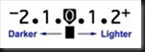
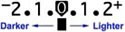
expscaleI recommend we use –1/2 to –2/3 stop exposure compensation.  That is to say, we tell the camera to decrease the exposure by 1/2 or 2/3’s of a stop.  Your camera will display a scale similar to this one that will show the amount of exposure compensation.  On the minus side, 1 means decreasing the exposure or darkening the image by one stop.  Two means the exposure is decreased and the image is darkened by two stops.  The positive side increases or brightens the image by one and two stops respectively.

If your camera is set up to adjust exposure by half stop increments there will be one dot between the numbers as in this illustration.  If it is set up to adjust exposure by one third stop increments there will be two dots.  I prefer to set my camera to adjust exposure by 1/3 stop increments.  And then I set my exposure compensation to –2/3 stops.

You may need to check your camera’s manual to determine exactly how to set your camera’s exposure increments and how to do exposure compensation.

Auto ISO

The third change is to set your ISO setting on Automatic.  ISO refers to the sensitivity of the camera’s sensor which in turn affects the amount of light required to produce a correct exposure.  The greater the sensitivity, the less light is required.  Increasing the ISO increases the sensor’s sensitivity.  So an ISO of 100 has low sensitivity and requires more light for a correct exposure.  An ISO of 400 has much higher sensitivity and therefore requires much less light for a correct exposure.

Cameras produce the highest quality images at low ISOs.  And when the ISO is set on Auto the camera will automatically select the lowest possible setting to give you the highest quality image in the prevailing light conditions.

As with exposure compensation, you may need to consult your camera’s manual to determine exactly how to do this.

I use these settings myself on my Canon point and shoot (G11), the camera I take with me everywhere I go.  When I’m doing casual shooting or even scouting for ‘serious’ photograph locations I’ll use the G11 configured in this way.  In times like these I don’t want to be focusing on exposure settings, ISO and all the other things I think about when shooting my big Canon.  I want to focus on the image and the compositional possibilities.  And these settings allow me to do that and still capture high quality images.

So, try them for yourself and see if you like them.  Set up your camera in this way and shoot some photographs.  I think you’ll be pleased with the results.

Join me on an upcoming workshop.  Click here for more details.

To see more of my photographs click here.

(1834)

Preparing Photographs–Printing, Matting and Framing

Here’s an outline of how I prepare photographs to display and sell.

I’ve been printing, matting and framing for the past several days ,getting ready for the first shows of 2011.  I have a lot of new photographs so this is both a busy and an exciting time.

It occurred to me that I went through a lot of trial and error  when I first started this process of preparing photographs to display and sell, and that it just might be helpful to some if I shared the system I finally worked out.

Continue reading “Preparing Photographs–Printing, Matting and Framing”

(1669)

Mastering Exposure–Histograms Part 3

This is the third post in a series on the histogram. This post discusses the Rocky Mountain histogram, what it is, when you can get it, how to photograph and how to do the post processing.

This is the third post in a continuing series on the oft misunderstood but oh so important histogram.  In the first two posts we discussed the histogram in general.  If you missed them, click on these links.

Mastering Exposure – Histograms Part 1

Mastering Exposure – Histograms Part 2

Recap

To recap, the histogram displays a graph of the tonal values in the scene you are about to photograph.  It shows how the dynamic range of the scene matches and fits into the dynamic range of your camera’s sensor.  There are two critical pieces of information a histogram tells you:

  1. If your exposure is correct
  2. If you have problems capturing the dynamic range of the scene

To recap, the exposure is displayed by the position of the histogram curve within the boundaries of the graph area.  As you increase the exposure the histogram moves to the right.  As you decrease the exposure it moves to the left.  If the exposure is increased so that the histogram moves all the way up against the right side of the graph area you will have highlight clipping. Likewise, if it moves all the way to the left side you will have shadow clipping.

The dynamic range of the scene is displayed as the breadth of the histogram,  The wider the histogram the greater the dynamic range of the scene.  The narrower the histogram the lower the dynamic range.  When the histogram is so wide that it extends from one end of the graph area to the other you are facing a situation where your camera’s sensor will have a difficult time capturing the full dynamic range of the scene.  The worst case is you will have both highlight and shadow clipping.

Continue reading “Mastering Exposure–Histograms Part 3”

(2333)

Dewitt Jones Said It All

I was reading an article by Dewitt Jones in the latest Outdoor Photographer last night.  I always enjoy reading him; he is so positive and full of enthusiasm.  The title of the article was Don’t Prove…Improve!  He was recounting his experience when he got hired on as a National Geographic Photographer.  Dewitt was a little intimidated.  His new boss, Bob Gilka, gave him some advice that applies to us all.  He told Dewitt, “You don’t have to prove yourself, not to me or to the other photographers.  What I do demand that you do is improve yourself.  Every day….”

Dewitt goes on to write,

“[Gilka] understood that when we shoot from our own unique vision, there’s no reason to ‘prove’ ourselves…. There’s only one person on the planet who can do what we do, see as we see.

“Improve ourself?  That’s a different story.  There’s so much for all of us to learn to make our vision clearer, stronger, sharper.  And Gilka knew that the fastest way to learn is to trust and share rather than compete.”

Yep, I always enjoy reading Dewitt’s comments.  He is so positive.  And right on.

(990)

Backup Your Photos

Presenting a solution for backing up your iimportant photo files while also being able to share them between computers.

Some time ago I thought I had lost a year’s worth of RAW files.  I was using Photoshop Bridge which I rarely  use (I use Lightroom to manage my photos) and it had inadvertently moved the folder when I thought the folder was deleted.  It took a couple of days to find copies of all the supposedly deleted files, only to find a week or so later that they were all still there, just in a different location.

That launched an ongoing effort to come up with a better backup strategy.  The solution is still evolving but it’s to a point where it’s worth sharing with you.

Continue reading “Backup Your Photos”

(1831)

Mastering Exposure–Histograms Part 2

Take a deep dive into the often misunderstood histogram and discover the critical role it plays in capturing great photographs.

A few weeks ago I published the first of a series of articles on histograms, “Mastering Exposure – Histograms Part 1.”  I eventually want to talk about different types of histograms and how to work with them in the field and during the post processing.  But before getting into that I want to take a deeper dive into the histogram itself.

Continue reading “Mastering Exposure–Histograms Part 2”

(2875)