Mastering Composition – Rule of Thirds

Use the Rule of Thirds to create visual tension in your images and stimulate the viewer’s interest.

The Rule of Thirds is a compositional principle that is widely used. And for good reason because, well, it works.  At least, it works in a lot of situations.

What is the Rule of Thirds? You superimpose a tic-tac-toe grid on your image, two vertical lines equally spaced and two horizontal lines equally spaced. Then you place the key elements of your image on or near those lines, or at one of their intersections.  They don’t have to be exactly on the lines or intersections, just near them.  This is art, not engineering, so it’s important that it feels right.  But the Rule of Thirds gives us positions that are visually very strong and command the viewer’s attention.  That’s why you want to use this principle for the key elements of your composition, the elements you want to draw the viewer’s eye to.
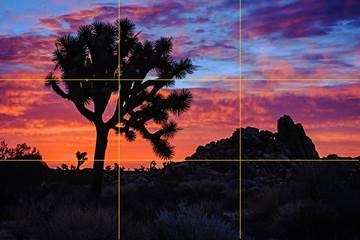
clip_image002

One should be cautious in overusing the Rule of Thirds. It should not be applied mechanically and certainly not universally.  It does not apply to all compositions.  After all, aren’t our ‘Rules’ of composition made to be broken?  But on the other hand, sometimes a composition gets just a little bit stronger when you move the key element just a tiny bit to place it closer to or right on a 1/3rd line.

The fact is it works so well in so many situations that the camera manufacturers give us the ability to display the grid on our camera’s LCD screens and viewfinders. Also, software publishers like Adobe display the grid when we use the crop tool. This is true of Elements, Lightroom and Photoshop. And these aids can be very helpful in achieving strong compositions.

Why does the Rule of Thirds work so well? To answer that let’s talk about Visual Tension.

Continue reading “Mastering Composition – Rule of Thirds”

(2868)
12 Tips on Nighttime Photography

Nighttime photography poses its own challenges. Here are some helpful tips on preparing for and getting the most out of your hours spent in the dark.

Here are some tips on nighttime photography from an informative article by Dan Richards in a recent issue Popular Photography.  Credit for these tips goes to three great photographers – Matt Walker, Darren White and Mashahiro Miyasaka.  Here is the heart of what they shared…

  • Use a fast, wide lens.  Wide lenses slow the apparent motion of the stars.  Fast lenses gather more of the faint light.
  • Use a tripod.  The shortest practical exposure is 30 seconds.  Star trails require anything from tens of minutes to an hour or more.
  • Use an intervalometer.  This is essential for exposures greater than 30 seconds or if you plan to take a sequence of 30 second exposures.
  • Be aware of the weather.  An overcast sky will foil nighttime photography plans and a wind will wreak havoc with long exposures.
  • Be careful.  Scout the location ahead of time.  Use a headlamp, especially  one that has a red light so as not to destroy your night vision.
  • Include interesting foregrounds.  They can be silhouettes or you can light paint them.  You also have the option of creating a composite image by capturing a well exposed image of the foreground at low ISO and a high ISO image of the sky and then blending the two.
  • Focusing is really difficult.  Autofocus doesn’t work so you must use manual focus.  Pick the brightest star in the sky and use live view to focus on it (don’t change your focal length to focus; use the focal length you’ll be using for your image).  Another alternative is to focus on an object at infinity during the day and then marking the focus point with fluorescent tape so you can reset the same focus at night.  Again, use the focal length you will be shooting with as the infinity focus point changes as you zoom in and out.
  • Exposure is critical.  If you’re going to shoot starry  night photographs your exposure length will be 30 seconds (with a 24 mm lens or wider).  Shoot wide open and run tests with different ISO settings.  If  you’re going to use a long exposure to get star trails determine the ISO setting your 30 second exposure and then adjust ISO and f/stop to compensate for the length of exposure.  If your ISO is 6400 at f/2.8 and 30 seconds, if you want a 60 second exposure reduce your ISO to 3200.  A two-minute exposure requires an ISO of 1600.
  • Take a workshop.  That’s always good advice, no matter how experienced you are.  There’s always more to learn.
  • Don’t get disheartened.  This is not easy stuff but practice pays off.
  • Get in shape.  Good locations for night photography are going to be where there’s minimal light pollution and that’s a long ways away from city lights.
  • When the temperature is cold wrap a hand warmer around your lens to keep it from fogging over on those long half hour to hour exposures.

Well, that’s it.  Yea, and I confess; I threw in a couple of my tips too.

Hey, here are a couple of blog posts I’ve done on nighttime photography a while back there.

Exciting Nighttime Photography in 10 Easy steps

Nighttime Photography

So, go on out there and give it a try.  Have fun and be careful.


We always enjoy hearing from you so please feel free to leave a comment and share your experiences with us.

Also sharing this post on Google+, Facebook, Twitter and the like is also appreciated.

Join me on an upcoming workshop.  Click here for more details.

To see more of my photographs click here.

(925)

Mastering Composition – Balance

Strengthen your images by considering Balance in your compositions.

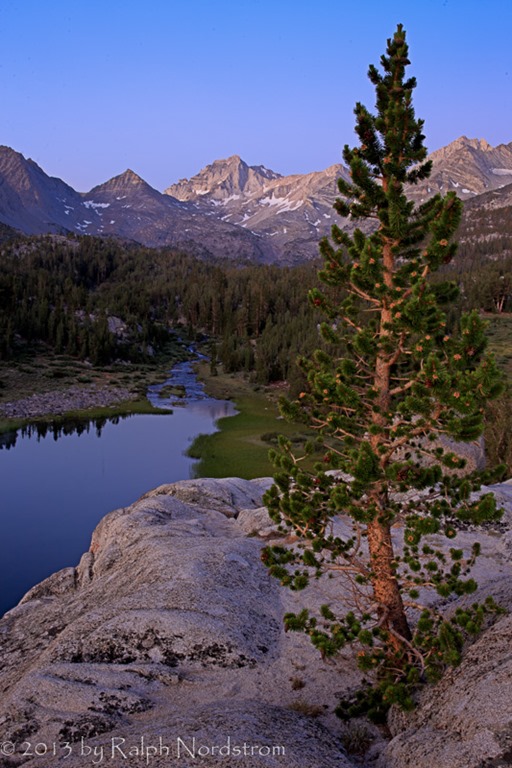
There are many rules of composition.  I know people don’t like to use the term rules and for good reason.  If you treat these rules as if they are hard and fast you can end up with compositions that are mechanical.  So I prefer to call them ‘principles of composition.’  Now I’ve said before that composition is a problem solving endeavor.  That is, you have been inspired by what lies before you, you have connected with it and you have an idea of what you want to say.  And one of the key elements in communicating your message is the composition you choose.  There is generally a point where this becomes very much of a problem solving effort, meaning it can get very analytical.  And while the analysis may be important if not essential, it can cloud aesthetic considerations.  Take for example this photograph of dawn in the Little Lakes Basin up Rock Creek in the Sierra Nevada Mountains of California.

eastern_sierra_130713__SM37004-Edit

I was drawn to this Lodgepole Pine growing from a cleft in the granite above the lake.  I gave a lot of thought to this composition and compositional principles came very much into play.  The way I saw it, the two key elements were the tree and the lake.  I didn’t think of the peaks in the distance as being a key element although I knew they were important.  And I was aware of the lake as a leading line the drew the eye to them. I placed the tree on the right 1/3 line so that it wouldn’t block the lake.  And I enjoyed the wonderful alpenglow as I captured a few images through the final minutes of civil twilight.  Then I wandered off looking for other photographs.  But later, after the sun came up I was drawn back to this tree and saw it completely differently.

Continue reading “Mastering Composition – Balance”

(1689)

Mastering Composition – What?

Asking yourself, ‘What am I photographing?’ can lead to stronger images that communicate the excitement and inspiration you feel.

Composition is one of the four pillars of a strong landscape photograph (See Making a Photograph – The Four Pillars).  There are many approaches to mastering composition and certainly countless excellent books on the topic.  Many books discuss the elements of design and how they relate to composition – line, shape, form, texture, pattern and color.  Others go into the various rules of composition – rule of thirds, golden rule, leading lines, near / far, layers, frames, etc.

All of these rules or principles are very analytical and, I think, are necessary and useful building blocks.  Often creating a strong composition is very much of a problem-solving endeavor.  But in the end I believe the goal of the composition is to support what the artist wants to communicate through the image.  And this comes more from compositions that just feel right, not ones that are mechanically created from the rules.  That’s not to say that one is not aware of these principles as the composition is being worked out.  Rather these principles are like words in a sentence.  They are carefully chosen so that the sentence as a whole communicates the author’s message.  There are several techniques that lead us to this goal.  And one of them is to ask yourself, ‘’”What am I photographing?”

Continue reading “Mastering Composition – What?”

(1719)

Mastering Exposure – Expose to the Right

Expose to the Right – put it to the test by creating and comparing actual images.

Over the years there has been a lot of interest in the concept of ‘Expose to the right.’  This is something that is commonly done in digital photography where you intentionally overexpose an image.  The idea is that in digital images there is more information to work with in the brighter tonalities than there is in the darker.  And this will give you more to work with in the darkroom (Lightroom and Photoshop) which will result in a better image.

I’ve written several posts on this topic and if the concept is new to you please read these.  I’m not going to go into the theory here; that is spelled out in these posts.

Lightroom Tutorial – Expose to the Right

Expose to the right – Revisited

Now, I understand the theory.  I’m a computer guy; I had better understand it.  But I’ve always wondered if the promise of a better image actually worked out in real life.  So I did a test during our recent workshop to Big Sur.

Continue reading “Mastering Exposure – Expose to the Right”

(2356)

Big Sur Photography Workshop – Highlights

The November Big Sur photography workshop offered some of the best conditions I have ever seen. Read more about it.

We wrapped up the 2014 winter Big Sur workshop last night with a spectacular sunset at Point Lobos in Carmel, California.  But hold on.  Before we get to that I want to share with you some of the highlights from this week.

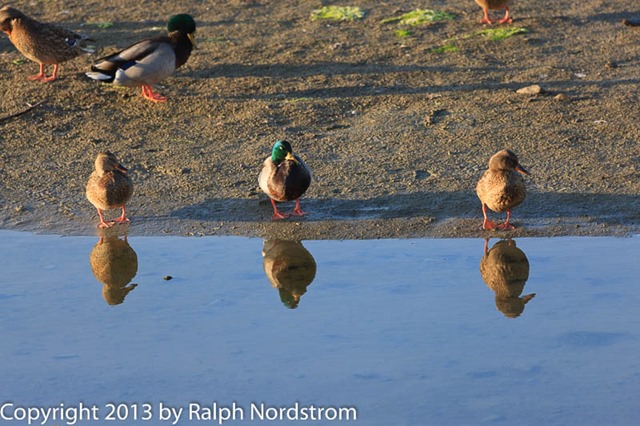
Let’s start with a funky photograph I got at the Santa Rosa Creek estuary way south down in Cambria, California.  I went up to Cambria a couple of days before the workshop started for a little exploring.  It paid off.  I call this one, “Get Your Ducks in a Row.”

big_sur_131103__SM38329

Also that same day I caught a surfer catching a wave.  The surf was definitely up.

big_sur_131103__SM38376

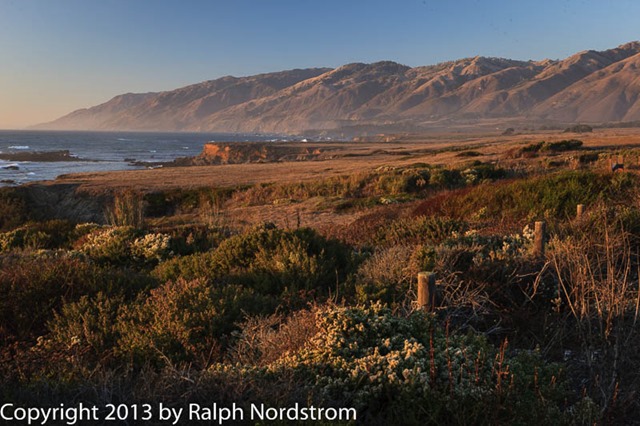
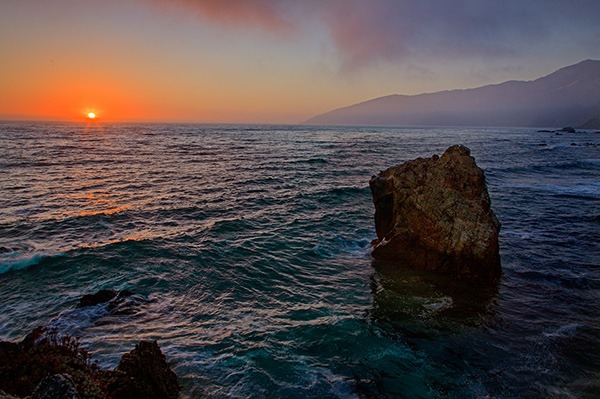
We start the workshop Monday in San Simeon at the southern end of the Big Sur coast.  To get it off to a good start we photographed sunset at the southern end of the impressive Big Sur headlands.  And we were treated to some equally impressive light.

big_sur_131104__SM38454

Continue reading “Big Sur Photography Workshop – Highlights”

(1995)

Getting Great Landscape Photographs – Tripods

How I came to own the tripod I now use.

Like many of us I was passionate about photography when I was in college and for a while afterwards.  Then the effort seriously building a career started consuming all my time and photography got pushed aside.  But I bought a new camera when my daughter was born and that kick started my return to photography.  It wasn’t long after that that I started getting back into landscape photography and I went out to purchase a tripod.  I didn’t have a lot to spend so I picked up one in the $125 range and said ‘Ouch’ when I put it on my credit card.  It was something like this one.

tripod-under-200

Every time I wanted to use it I had to screw the camera on to the camera mount.  It wasn’t very tall so I find myself extending the center post all the time and still I had to hunch over to look through the viewfinder.  But it was light weight and I thought all the handles and nobs used to aim and adjust your camera were pretty cool, even if they were a bit awkward.

I got a lot of use out of it – until I set it down at Mt Rushmore, forgot it, and walked off.  When I discovered my mistake we want back to check with the rangers to see if anyone had turned it in.  Of course it was gone.  So we rushed into Rapid City, South Dakota to find a camera store and buy another one for the rest of the trip.  I got the same kind.

It took awhile but it eventually became apparent that a $125 tripod just wasn’t going to do the trick.  It wasn’t very solid and was pretty awkward to use.  So I started reading up on them.  I came across the blog article that explained how you can save $2000 on a tripod by spending $2000 on your first tripod.  That still seemed like a lot of money.  But if that is what it was going to take, ….  So, working from the bottom up I started putting together what I needed.

Continue reading “Getting Great Landscape Photographs – Tripods”

(2050)

Color Management Made Simple – From Computer to Print

Color Management can be a difficult topic. But we’re breaking it down for you. This is the third in a series of articles on the topic – from the Computer to the Print. For a full understanding, read all three.

Color Management is the science of getting the colors you want in your photographs – consistently.  And in my workshops I hear all too often that people are disappointed because the colors they get in their prints are not what they saw on their monitors.  They often go to a lot of work preparing an image and when they print it it’s as if all that work was a waste of time.

Color Management is indeed a science and can be very complicated and technical.  But getting the same colors on the print that you see on your monitor is essential if you are to have control over the creative process.  For that, color management is the key and in these series of articles I’m trying to break it down to make it more understandable and accessible for all of us.

plaskette_rock_setting_sun_110808

In the previous two articles I presented the concept of a color space and what happens behind the scenes when you move the image from the camera to your computer.  See Color Management Made Simple – Color Space and Color Management Made Simple – From Camera to Computer.  In this article I’ll be covering the all important aspect of getting your prints to look like what you see on your monitor; that is, from Computer to Print.

Continue reading “Color Management Made Simple – From Computer to Print”

(3300)

Color Management Made Simple – From Camera to Computer

Read the second installment in a series of articles on Color Management – taking the image from the camera to your computer.

If Color Space can be described as a box of Crayons as we suggested in  Color Management Made Simple – Color Space,  what else do we need to know about Color Management?  Well, Color Management is essentially about getting the right colors – and here’s the most important word – consistently.

Let’s spend a few moments talking about the ‘right color.’  (I’m inclined to add, ‘whatever that is.’)  The story begins when you press the shutter.  Let’s suppose you are photographing the beautiful redwoods of Northern California.

redwoods_130528__SM36093_4_5_6_7-Edit

The scene is full of rich browns and oranges and vibrant greens.  We can say that these are the right colors, these are the colors you want.  You set up your camera and snap a picture and your sensor captures these colors, pretty much just as they are (the sensor is playing with pretty much the full big box of 120 Crayons). The camera’s processor does its thing and the image is saved in a file to your memory card.  Eventually we’re going to view the photograph on our computer’s monitor and we just might be a bit disappointed.

Continue reading “Color Management Made Simple – From Camera to Computer”

(1717)

File Naming Strategies

Having an effective file naming convention may not be the most exciting thing but it can sure make your life a lot easier.

OK, so this isn’t a very sexy topic but having a strategy for naming your image files can save you a lot of grief down the road.  Let me run through what I’ve worked out over the years (and believe me, it’s taken several years to perfect this).

So it starts in Lightroom which gives you the option of renaming your files when you import them.  I’m following Scott Kelby’s recommendation here.  Let’s start with a file name as it is created in the camera.  It’s going to look something like this – _SM35116.CR2.  By the way, here’s the photograph that that goes with.

hidden_valley_130119

Hidden Valley (2013)

Continue reading “File Naming Strategies”

(2888)